A Professional Menu Sells 30% More.
Yours Can Too.
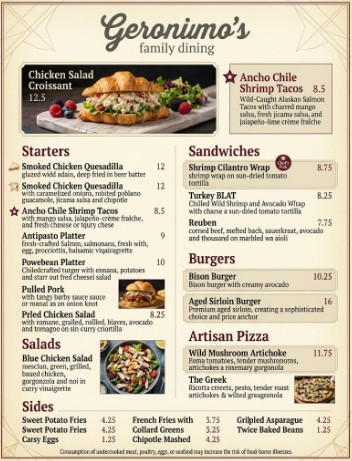
Take a photo of your existing menu — that's all you need. ReMenu extracts every item, builds a professional layout, and delivers a print-ready PDF and live digital menu in minutes.
No design skills needed · 300 DPI print-ready PDF
30%
more high-margin item sales
with a professional menu vs. a basic text menu
+6.5%
sales lift per item
when a food photo is included on the menu
84%
of diners check online first
before deciding where to eat or what to order
Built to sell, not just look good.
The same menu engineering principles used by top restaurant chains — automated, in minutes, from a photo of your existing menu.
AI Reads Your Entire Menu
Gemini AI extracts every item name, price, description, and category from any photo — dark, blurry, or crumpled. No manual data entry.
Engineered to Drive Sales
Golden-ratio layouts, automatic high-margin item highlighting, and visual tension principles — the psychology top restaurant chains use, automated.
Print-Ready in Minutes
300 DPI CMYK PDF for your print shop — no waiting on a designer. Plus a live digital menu your guests access instantly by QR code.
How it works
Upload. Review. Style. Tune. Export. Your professional menu, done.
Upload Your Menu
Take a photo of your existing menu — any quality, any lighting. Gemini AI reads every item, price, and description. No typing.
Review & Edit
Confirm the AI extraction in seconds. Fix anything that's off, add missing items, or attach your own food photos.
Set Your Brand
Upload your logo. Pick your paper size and menu style. The AI extracts your brand colors and handles the layout logic.
Fine-Tune Live
Your designed menu appears on a live canvas. Adjust fonts, swap photos, reorder sections — every change is instant.
Export Everything
Download a 300 DPI print-ready PDF. Share your live digital menu URL. Print your QR table tent. Done.
Everything ready to use. Instantly.
Three deliverables from one photo.
300 DPI Print-Ready PDF
Formatted to your paper size with CMYK-safe colors. Send it directly to any print shop — or print it yourself.
Live Digital Menu URL
A mobile-optimized menu at your own link. Guests scan your QR code to view it on any phone — no app, no download.
Scannable Menu QR Code
A downloadable QR code graphic for table display. Print it, set it out, and guests instantly access your full digital menu on any phone.
Common questions
What if the AI misreads something on my menu?
You review everything before anything is used. The Verify step shows every extracted item — edit, reorder, delete, or add anything before moving forward. You have full control.
Do I need to install anything or connect my POS?
Nothing to install. ReMenu works in any browser on any device. It doesn’t connect to your POS — all you need is a photo of your existing menu.
What photo quality do I need?
Any quality works. Gemini AI is built to read dark, blurry, crumpled, or low-resolution menu photos. If a person can read it, the AI can too.
Is my menu data private?
Your menu data is used only to generate your redesign. It is never sold, shared, or used to train AI models.
Your menu is costing you sales. Every day.
You're one photo away from a menu that works as hard as you do.
Upload My Menu — It's Free →